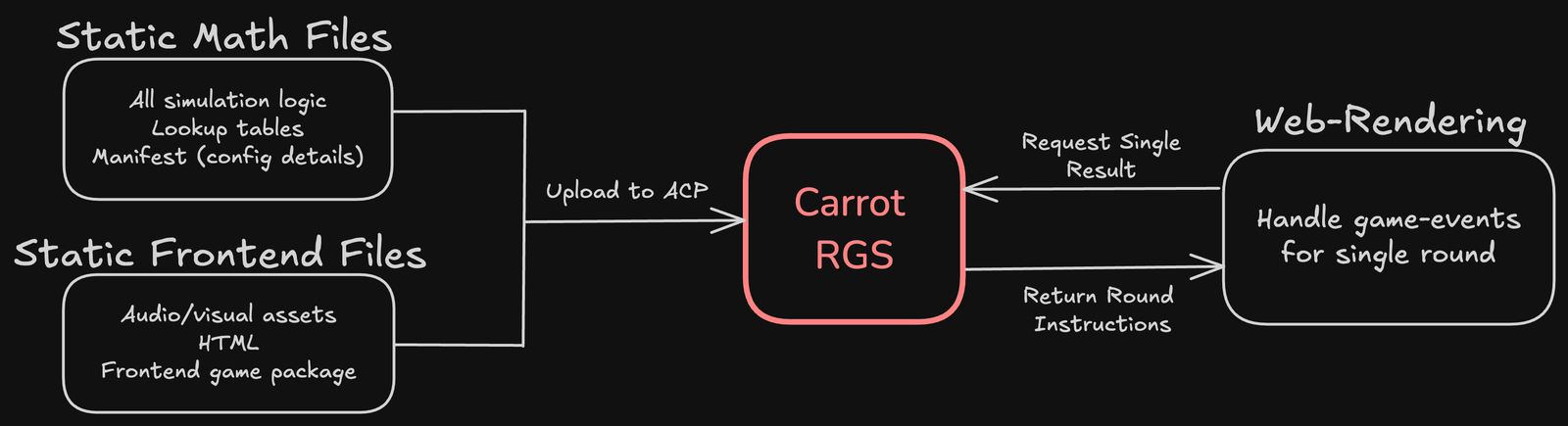
In brief
Publish the frontend and math files into a staging game, verify that they work together, and submit a specific finalized version for review. Uploading files or launching a developer session is not the same as public approval on Stake.
- Build a complete frontend directory, not just an HTML file.
- Keep each math mode's index, events and weights consistent.
- Freeze the reviewed versions and retain the evidence used to produce them.
Before opening the control panel
Use your legitimate Engine developer account and the access your team has been granted. Account eligibility, team onboarding and commercial terms must be confirmed with Engine; this series does not establish those conditions for you. Never borrow another team's account to work around an access restriction.
Prepare a release folder with four parts: frontend, math, promotional assets and documentation. Keep secrets, source-only artwork, package caches and local diagnostic files out of the public upload directories.
Build the standard frontend
From the web repository root, the reference project uses:
pnpm run build --filter=lines
The pinned web README describes collecting apps/lines/.svelte-kit/output/prerendered/pages/index.html and the contents of apps/lines/.svelte-kit/output/client into one upload directory. Inspect the output of your revision; do not assume a different adapter has identical paths.
Confirm that the packaged HTML loads every required script, font and image from the intended deployment location. Test the packaged directory, not only the development server. A single-HTML export from Slotgen's earlier local work is a separate packaging choice, not an Engine acceptance requirement.
Assemble the math mode files
The math format specification requires an index.json, weighted CSV data and Zstandard-compressed JSON-lines events. An index entry names a mode, its cost and its corresponding files. For illustration, a cost-one base mode has this shape:
{
  "modes": [{
    "name": "base",
    "cost": 1.0,
    "events": "books_base.jsonl.zst",
    "weights": "lookUpTable_base_0.csv"
  }]
}
Use your generated filenames and configuration; this example is not a substitute for the real export. Verify unique outcome identity, matching payouts and referenced files. Keep capitalization exact. A successful upload of mismatched versions is not a valid integration.
Create a manifest listing the math revision, frontend revision, mode names, costs, intended RTPs, cap values and file hashes. Use it to identify exactly which pair was tested. Never edit a published lookup table manually to make a dashboard number look right.
Upload, publish to staging, and launch
The official frontend launch instructions describe importing the complete frontend folder on the game's Files page, choosing Publish Game → Front End, and starting a session from Developer with Launch in New Tab. Upload and publish the matching math through the corresponding math controls available to your team. Labels may evolve; use the current control panel rather than guessing a missing button.
Verify the selected frontend and math versions, then run the staging cases from part 9. Check ordinary play, each enabled mode, a recovered round, currency formatting, rules and restricted features. Redact launch-session parameters when recording evidence.
If the build works locally but fails here, inspect asset paths, missing files, case mismatches, mode names, version pairing and the actual response error. Do not weaken authentication or replace the server result with a mock.
Prepare the game tile and description
The game-tile requirements ask for a background, transparent foreground and provider logo. The page specifies a combined background/foreground limit of 3 MB and filename patterns such as GameTitle-BG, GameTitle-FG and ProviderName-Logo. Supply clean, legible artwork rather than a screenshot of the whole interface.
Write a short factual description of the theme and mechanics. Supply accurate rules and promotional material without inventing player outcomes, approval claims or commercial performance. Keep editable originals and the rights record in your private production archive.
Submission is a separate decision
Use the current team checklist, submit the exact finished versions and track requested changes. The general approval guidance says post-approval changes are restricted: minor visual fixes differ from changes to math, modes or mechanics. Plan major corrections before submission and ask Engine how a later change must be handled.
Do not change files behind a recorded release identifier. If a correction is requested, create a new identifiable package, rerun the affected checks and show what changed. Keep the last tested package available for diagnosis, while following Engine's permitted deployment procedure.
Finish this part
You should have a versioned staging build, validation reports, device-test results, promotional assets and a submitted review request when your team is ready. Only a confirmed platform decision justifies saying the game is approved or publicly available.